Simple Guide to Follow for Better Endpoint Protection

Simple Guide to Follow for Better Endpoint Protection
Endpoints make up much of a company’s network and IT infrastructure. This is a collection of computers, mobile devices, servers, and smart gadgets. As well as other IoT devices that all connect to the company network.

The number of endpoints a company has will vary by business size. Companies with less than 50 employees have about 22 endpoints. Small businesses with 50-100 employees have roughly 114.  Enterprise organizations with 1,000+ employees average 1,920 endpoints.

Each of those devices is a chance for a hacker to penetrate a company’s defenses. They could plant malware or gain access to sensitive company data. An endpoint security strategy addresses endpoint risk and puts focused tactics in place.

64% of organizations have experienced one or more compromising endpoint attacks.

In this guide, we’ll provide you with straightforward solutions. Solutions focused on protection of endpoint devices.

Address Password Vulnerabilities

Passwords are one of the biggest vulnerabilities when it comes to endpoints. The news reports large data breaches all the time related to leaked passwords. For example, there is the RockYou2021 breach. It exposed the largest number of passwords ever – 3.2 billion.

Poor password security and breaches make credential theft one of the biggest dangers to cybersecurity.

Address password vulnerabilities in your endpoints by:

  • Training employees on proper password creation and handling
  • Look for passwordless solutions, like biometrics
  • Install multi-factor authentication (MFA) on all accounts

Stop Malware Infection Before OS Boot

USB drives (also known as flash drives) are a popular giveaway item at trade shows. But an innocent-looking USB can actually cause a breach. One trick that hackers use to gain access to a computer is to boot it from a USB device containing malicious code.

There are certain precautions you can take to prevent this from happening. One of these is ensuring you’re using firmware protection that covers two areas. These include Trusted Platform Module (TPM) and Unified Extensible Firmware Interface (UEFI) Security.

TPM is resistant to physical tampering and tampering via malware. It looks at whether the boot process is occurring properly. It also monitors for the presence of anomalous behavior. Additionally, seek devices and security solutions that allow you to disable USB boots.

Update All Endpoint Security Solutions

You should regularly update your endpoint security solutions. It’s best to automate software updates if possible so they aren’t left to chance.

Firmware updates are often forgotten about. One reason is that they don’t usually pop up the same types of warnings as software updates. But they are just as important for ensuring your devices remain secure and protected.

It’s best to have an IT professional managing all your endpoint updates. They’ll make sure updates happen in a timely fashion. They will also ensure that devices and software update smoothly.

Use Modern Device & User Authentication

How are you authenticating users to access your network, business apps, and data? If you are using only a username and password, then your company is at high risk of a breach.

Use two modern methods for authentication:

  • Contextual authentication
  • Zero Trust approach

Contextual authentication takes MFA a step further. It looks at context-based cues for authentication and security policies. These include several things. Such as, what time of day someone is logging in, their geographic location, and the device they are using.

Zero Trust is an approach that continuously monitors your network. It ensures every entity in a network belongs there. Safelisting of devices is an example of this approach. You approve all devices for access to your network and block all others by default.

Apply Security Policies Throughout the Device Lifecycle

From the time a device is first purchased to the time it retires, you need to have security protocols in place. Tools like Microsoft AutoPilot and SEMM allow companies to automate. They deploy healthy security practices across each lifecycle phase. This ensures a company doesn’t miss any critical steps

Examples of device lifecycle security include when a device is first issued to a user. This is when you should remove unnecessary privileges. When a device moves from one user to another, it needs to be properly cleaned of old data. And reconfigured for the new user. When you retire a device, it should be properly scrubbed. This means deleting all information and disconnecting it from any accounts.

Prepare for Device Loss or Theft

Unfortunately, mobile devices and laptops get lost or stolen. When that happens, you should have a sequence of events that can take place immediately. This prevents company risk of data and exposed business accounts.

Prepare in advance for potential device loss through backup solutions. Also, you should use endpoint security that allows remote lock and wipe for devices.

Reduce Your Endpoint Risk Today!

Get help putting robust endpoint security in place, step by step. We can help! Contact us today for a free consultation.

Article used with permission from The Technology Press.
Did You Just Receive a Text from Yourself? Learn What Smishing Scams to Expect

Did You Just Receive a Text from Yourself? Learn What Smishing Scams to Expect

How many text messages from companies do you receive today as compared to about two years ago? If you’re like many people, it’s quite a few more.

This is because retailers have begun bypassing bloated email inboxes. They are urging consumers to sign up for SMS alerts for shipment tracking and sale notices. The medical industry has also joined the trend. Pharmacies send automated refill notices and doctor’s offices send SMS appointment reminders.

These kinds of texts can be convenient. But retail stores and medical practices aren’t the only ones grabbing your attention by text. Cybercriminal groups are also using text messaging to send out phishing.

Phishing by SMS is “smishing,” and it’s becoming a major problem.

Case in point, in 2020, smishing rose by 328%, and during the first six months of 2021, it skyrocketed nearly 700% more. Phishing via SMS has become a big risk area. Especially as companies adjust data security to a more remote and mobile workforce.

How Can I Text Myself?

If you haven’t yet received a text message only to find your own phone number as the sender, then you likely will soon. This smishing scam is fast making the rounds and results in a lot of confusion. Confusion is good for scammers. It often causes people to click a malicious link in a message to find out more details.

Cybercriminals can make it look like a text message they sent you is coming from your number. They use VoIP connections and clever spoofing software.

If you ever see this, it’s a big giveaway that this is an SMS phishing scam. You should not interact with the message in any way and delete it instead. Some carriers will also offer the option to delete and report a scam SMS.

Popular Smishing Scams to Watch Out For

Smishing is very dangerous right now because many people are not aware of it. There’s a false sense of security. People think only those they have given it to will have their phone number.

But this isn’t the case. Mobile numbers are available through both legitimate and illegitimate methods. Advertisers can buy lists of them online. Data breaches that expose customer information are up for grabs on the Dark Web. This includes mobile numbers.

Less than 35% of the population knows what smishing is.

It’s important to understand that phishing email scams are morphing. They’ve evolved into SMS scams that may look different and be harder to detect.

For example, you can’t check the email address to see if it’s legitimate. Most people won’t know the legitimate number that Amazon shipping updates come from.

Text messages also commonly use those shortened URLs. These mask the true URL, and it’s not as easy to hover over it to see it on a phone as it is on a computer.

You need to be aware of what’s out there. Here are some of the popular phishing scams that you may see in your own text messages soon.

Problem With a Delivery

Who doesn’t love getting packages? This smishing scam leverages that fact and purports to be from a known shipper like USPS or FedEx. It states that there is a package held up for delivery to you because it needs more details.

The link can take users to a form that captures personal information used for identity theft. One tactic using this scam is to ask for a small monetary sum to release a package. Scammers created the site to get your credit card number.

Fake Appointment Scheduling

This scam happened to a community in South Carolina. They had recently had an installation of AT&T fiber internet lines in their neighborhood. Following the installation, AT&T did a customer drive to sign people up for the service.

During this time, one homeowner reported that he received a text message. It pretended to be from AT&T about scheduling his fiber internet installation. He thought it was suspicious because the address they gave was wrong. The scammer had wanted him to text back personal details.

Get Your Free Gift

Another recent smishing scam is a text message that doesn’t say who it’s from. It says, “Thank you for your recent payment. Here is a free gift for you.” It includes a link at the bottom of the message.

This is a widespread scam that many have noted online. And it’s an example of a scammer using a common fact. The fact that most people would’ve paid some type of bill recently and mistake the text to be from a company they know. It also lures people in with the promise of giving them a free gift.

Does Your Mobile Device Have the Security It Needs

Smishing scams are very clever and can easily infect your device with malware. Do you have the proper security precautions (mobile antivirus, DNS filtering, etc.)?

If not, give us a call. We can help!

Article used with permission from The Technology Press.
5 Exciting Ways Microsoft 365 Can Enable the Hybrid Office


5 Exciting Ways Microsoft 365 Can Enable the Hybrid Office

“Hybrid office” is the new buzzword you’ll hear used in business discussions. It’s the mix of having employees both working at the office and working from home. This has become more than a buzzword and is now the reality for many companies.

There was a survey of employees with remote-capable jobs. The survey found that as of February of 2022, 42% of them were working a hybrid schedule. And 39% were working from home full time.

The global pandemic brought on this hybrid office transition. It forced companies to operate with teams that could no longer safely come to the office. During this time, employers and employees experienced the benefits of hybrid work firsthand.

These benefits of remote teams included cost savings for both workers and employers. It also allowed the company to operate with more flexibility. Improved worker morale was another advantage.

One fact surprised many employers that feared remote work would tank productivity.  It actually increased in many circumstances. 

63% of high-growth companies use a “productivity anywhere” hybrid work approach.

In order for hybrid teams to be productive they need to stay connected.  No matter where they work, the right technology tools should enable them.

One of the leaders in this space has been Microsoft. The company plans to add several exciting updates this year. These will provide more tools for companies to enable their hybrid teams.

Here are some of the ways you can use Microsoft 365 to optimize a productive hybrid office. Note, that some of these features are already out, and others should release later this year.

1. Microsoft Teams & Expanded Features

Microsoft Teams is much more than a team messaging app. The application combines the best features of virtual video meetings and messaging channels. It brings them together into a platform designed to be a secure online work hub.

MS Teams has come a long way in the last five years. And the company continues to add more features to enable hybrid offices. Some of the recent feature updates include:

  • The ability to do webinar registration
  • Presenter modes that provide a more professional virtual presence
  • Increased security through features like smart links and smart attachments
  • A full business VoIP phone system add-on
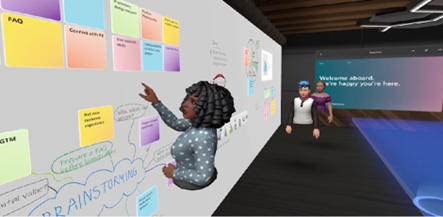
  • The addition of a “metaverse” component called Mesh for Teams

                                                                                                    Mesh for Microsoft Teams

New Meeting Options for RSVP in Outlook

One of the challenges, when everyone isn’t working in the same place, is how to know when to “clock in” and “clock out.” As well as how to let colleagues know whether you are working at home next week or the office.

To help hybrid teams better coordinate, Outlook is getting an update. It will allow users to RSVP to meetings. This can let team members know whether they are attending virtually or in person. 

Better Framing for More Engaging Meetings

One thing that can distract from the purpose of a meeting is someone’s background at home. Positioning of the camera can also be problematic. One person might have their face taking up 80% of the video screen. Another may only take up 20% because they’re sitting farther away from their PC’s camera.

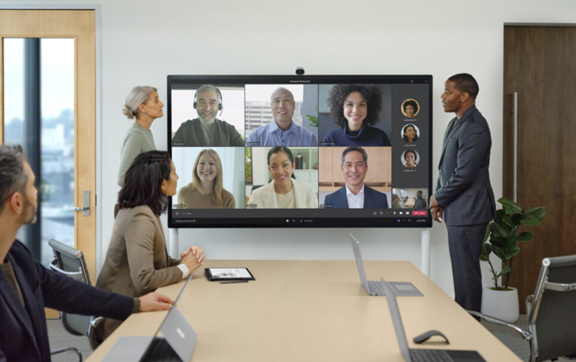
A new Surface Hub 2S Smart Camera will allow for better face framing. This will affect when people are meeting virtually in Microsoft Teams. Features include adjusting the room view so people’s faces will be clearer. As well as having more consistent sizing.

The video display will also automatically adjust as people join or leave a physical room. 

Get Better Control of Your Video Using PowerPoint to Present

People often share a screen in a video call and present a PowerPoint presentation. It can be difficult to keep everyone as engaged as when you’re presenting in person.

For example, in person, you can maintain eye contact. People can clearly see your facial expressions as you emphasize various things. That’s not always the case when presenting virtually. The app may push your video feed into a tiny box.

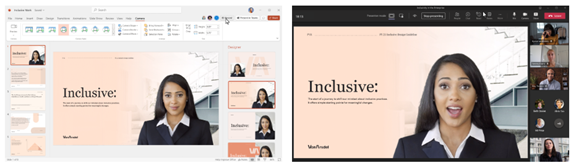
There’s a new upcoming feature for Teams called Cameo. It will allow you to seamlessly integrate PowerPoint with MS teams. You can decide exactly how you want your video feed to appear in relation to your presentation.

Another addition is Recording Studio. This new feature for PowerPoint allows you to record professional-looking on-demand videos. You can do it right inside the app. 

                                                                                   Cameo in PowerPoint & MS Teams

Get Help With Your Presentation Skills

Microsoft has poured a lot of AI capabilities into Microsoft 365 over the last several years. One that will soon help you deliver better virtual presentations is Speaker Coach.

This is a private and personalized coach. It can help you hone your presentation skills. This improves your switch to the differences between presenting online versus in person.

Some of the feedback it can provide include:

  • Use of repetitive language
  • Use of filler words (Ummm)
  • Speaking pace
  • Pausing for input
  • Intonation
  • Speaker overlaps
  • And more

Ask Us About Improving Your Hybrid Office Capabilities with Microsoft 365

Microsoft 365 has a ton of helpful features. But it does help to have an expert guide to help you navigate these capabilities. Contact us today to set up a chat about how Microsoft 365 can help your business grow.

Article used with permission from The Technology Press.