
Decoding Cyber Insurance: What Policies Really Cover (and What They Don’t)

a-person-typing-on-laptop

Decoding Cyber Insurance: What Policies Really Cover (and What They Don't)

For small businesses navigating an increasingly digital world, cyber threats aren’t just an abstract worry, they’re a daily reality. Whether it’s phishing scams, ransomware attacks, or accidental data leaks, the financial and reputational damage can be severe. That’s why more companies are turning to cyber insurance to mitigate the risks.

Not all cyber insurance policies are created equal. Many business owners believe they’re covered, only to find out (too late) that their policy has major gaps. In this blog post, we will break down exactly what’s usually covered, what’s not, and how to choose the right cyber insurance policy for your business.

Why Is Cyber Insurance More Crucial Than Ever?

You don’t need to be a large corporation to become a target for hackers. In fact, small businesses are increasingly vulnerable. According to the 2023 IBM Cost of a Data Breach Report, 43% of all cyberattacks now target small to mid-sized businesses. The financial fallout from a breach can be staggering, with the average cost for smaller businesses reaching $2.98 million. That can be a substantial blow for any growing company. 

Moreover, today’s customers expect businesses to protect their personal data, while regulators are cracking down on data privacy violations. A good cyber insurance policy helps cover the cost of a breach but also ensures compliance with regulations like GDPR, CCPA, or HIPAA, which makes it a critical safety net.

What Cyber Insurance Typically Covers

A comprehensive cyber insurance policy is crucial in protecting your business from the financial fallout of a cyber incident. It offers two main types of coverage: first-party coverage and third-party liability coverage. Both provide different forms of protection based on your business’s unique needs and the type of incident you’re facing. Below, we break down each type and the specific coverages they typically include.

First-Party Coverage

First-party coverage is designed to protect your business directly when you experience a cyberattack or breach. This type of coverage helps your business recover financially from the immediate costs associated with the attack.

Breach Response Costs

One of the first areas that first-party coverage addresses is the cost of managing a breach. After a cyberattack, you’ll likely need to:

  • Investigate how the breach happened and what was affected
  • Get legal advice to stay compliant with laws and reporting rules
  • Inform any customers whose data was exposed
  • Offer credit monitoring if personal details were stolen

Business Interruption

Cyberattacks that cause network downtime or disrupt business operations can result in significant revenue loss. Business interruption coverage helps mitigate the financial impact by compensating for lost income during downtime. It allows you to focus on recovery without worrying about day-to-day cash flow.

Cyber Extortion and Ransomware

Ransomware attacks are on the rise, and they can paralyze your business by locking up essential data. Cyber extortion coverage is designed to help businesses navigate these situations by covering:

  • The cost of paying a ransom to cyber attackers.
  • Hiring of professionals to negotiate with hackers to lower the ransom and recover data.
  • The costs to restore access to files that were encrypted in the attack.

Data Restoration

A major cyber incident can result in the loss or damage of critical business data. Data restoration coverage ensures that your business can recover data, whether through backup systems or through a data recovery service. This helps minimize disruption and keeps your business running smoothly.

Reputation Management

In the aftermath of a cyberattack, it’s crucial to rebuild the trust of customers, partners, and investors. Many policies now include reputation management as part of their coverage. This often includes:

  • Hiring Public Relations (PR firms) to manage crisis communication, create statements, and mitigate any potential damage to your business’s reputation.
  • Guidance on how to communicate with affected customers and stakeholders to maintain transparency.

Third-Party Liability Coverage

Third-party liability coverage helps protect your business from claims made by external parties (such as customers, vendors, or partners) who are affected by your cyber incident. When a breach or attack impacts those outside your company, this coverage steps in to defend you financially and legally.

Privacy Liability

This coverage protects your business if sensitive customer data is lost, stolen, or exposed in a breach. It typically includes:

  • Coverage for legal costs if you’re sued for mishandling personal data.
  • It may also cover costs if a third party suffers losses due to your data breach.

Regulatory Defense

Cyber incidents often come under the scrutiny of regulatory bodies, such as the Federal Trade Commission (FTC) or other industry-specific regulators. If your business is investigated or fined for violating data protection laws, regulatory defense coverage can help with:

  • Coverage may help pay for fines or penalties imposed by a regulator for non-compliance.
  • Mitigating the costs of defending your business against regulatory actions, which can be considerable.

Media Liability

If your business is involved in a cyberattack that results in online defamation, copyright infringement, or the exposure of sensitive content (such as trade secrets), media liability coverage helps protect you. It covers:

  • Defamation Claims – If a data breach leads to defamatory statements or online reputational damage, this policy helps cover the legal costs of defending the claims.
  • Infringement Cases – If a cyberattack leads to intellectual property violations, media liability coverage provides the financial resources to address infringement claims.

Defense and Settlement Costs

If your company is sued following a data breach or cyberattack, third-party liability coverage can help cover legal defense costs. This can include:

  • Paying for attorney fees in a data breach lawsuit.
  • Covering settlement or judgment costs if your company is found liable.

Optional Riders and Custom Coverage

Cyber insurance policies often allow businesses to add extra coverage based on their specific needs or threats. These optional riders can offer more tailored protection for unique risks your business might face.

Social Engineering Fraud

One of the most common types of cyber fraud today is social engineering fraud, which involves phishing attacks or other deceptive tactics designed to trick employees into revealing sensitive information, transferring funds, or giving access to internal systems. Social engineering fraud coverage helps protect against:

  • Financial losses if an employee is tricked by a phishing scam.
  • Financial losses through fraudulent transfers by attackers.

Hardware “Bricking”

Some cyberattacks cause physical damage to business devices, rendering them useless, a scenario known as “bricking.” This rider covers the costs associated with replacing or repairing devices that have been permanently damaged by a cyberattack.

Technology Errors and Omissions (E&O)

This type of coverage is especially important for technology service providers, such as IT firms or software developers. Technology E&O protects businesses against claims resulting from errors or failures in the technology they provide.

What Cyber Insurance Often Doesn’t Cover

Understanding what’s excluded from a cyber insurance policy is just as important as knowing what’s included. Here are common gaps that small business owners often miss, leaving them exposed to certain risks.

Negligence and Poor Cyber Hygiene

Many insurance policies have strict clauses regarding the state of your business’s cybersecurity. If your company fails to implement basic cybersecurity practices, such as using firewalls, Multi-Factor Authentication (MFA), or keeping software up-to-date, your claim could be denied.

Pro Tip: Insurers increasingly require proof of good cyber hygiene before issuing a policy. Be prepared to show that you’ve conducted employee training, vulnerability testing, and other proactive security measures.

Known or Ongoing Incidents

Cyber insurance doesn’t cover cyber incidents that were already in progress before your policy was activated. For example, if a data breach or attack began before your coverage started, the insurer won’t pay for damages related to those events. Likewise, if you knew about a vulnerability but failed to fix it, your insurer could deny the claim.

Pro Tip: Always ensure your systems are secure before purchasing insurance, and immediately address any known vulnerabilities.

Acts of War or State-Sponsored Attacks

In the wake of high-profile cyberattacks like the NotPetya ransomware incident, many insurers now include a “war exclusion” clause. This means that if a cyberattack is attributed to a nation-state or government-backed actors, your policy might not cover the damage. Such attacks are often considered acts of war, outside the scope of commercial cyber insurance.

Pro Tip: Stay informed about such clauses and be sure to check your policy’s terms. 

Insider Threats

Cyber insurance typically doesn’t cover malicious actions taken by your own employees or contractors unless your policy specifically includes “insider threat” protection. This can be a significant blind spot, as internal actors often cause severe damage.

Pro Tip: If you’re concerned about potential insider threats, discuss specific coverage options with your broker to ensure your policy includes protections against intentional damage from insiders.

Reputational Harm or Future Lost Business

While many cyber insurance policies may offer PR crisis management services, they usually don’t cover the long-term reputational damage or future business losses that can result from a cyberattack. The fallout from a breach, such as lost customers or declining sales due to trust issues, often falls outside the realm of coverage.

Pro Tip: If your business is especially concerned about brand reputation, consider investing in additional coverage or crisis management services. Reputational harm can have far-reaching consequences that extend well beyond the immediate financial losses of an attack.

How to Choose the Right Cyber Insurance Policy

As cyber threats continue to evolve, so too must your business’s protection. The right policy can be a lifesaver in the event of a breach, but not all policies are created equal. When selecting a cyber insurance policy, it’s important to understand what your business needs and to choose a policy that specifically addresses your risks. Let’s break down the steps to ensure you’re selecting the best coverage for your organization.

Assess Your Business Risk

Start by evaluating your exposure:

  • What types of data do you store? Customer, financial, and health data, all require different levels of protection.
  • How reliant are you on digital tools or cloud platforms? If your business is heavily dependent on technology, you may need more extensive coverage for system failures or data breaches.
  • Do third-party vendors have access to your systems? Vendors can be a potential weak point. Ensure they’re covered under your policy as well.

Your answers will highlight the areas that need the most protection.

Ask the Right Questions

Before signing a policy, ask:

  • Does this cover ransomware and social engineering fraud? These are growing threats that many businesses face, so it’s crucial to have specific coverage for these attacks.
  • Are legal fees and regulatory penalties included? If your business faces a legal battle or must pay fines for a breach, you’ll want coverage for these costly expenses.
  • What’s excluded and when? Understand the fine print to avoid surprises if you file a claim.

Get a Second Opinion

Don’t go it alone. Work with a cybersecurity expert or broker who understands both the technical and legal aspects of cyber risk. They’ll help you navigate the complexities of the policy language and identify any gaps in coverage. Having a pro on your side can ensure you’re adequately protected and help you make the best decision for your business.

Consider the Coverage Limits and Deductibles

Cyber insurance policies come with specific coverage limits and deductibles. Ensure that the coverage limit aligns with your business’s potential risks. For example, if a data breach could cost your business millions, make sure your policy limit reflects that. Similarly, check the deductible amounts, these are the costs you’ll pay out of pocket before insurance kicks in. Choose a deductible that your business can afford in case of an incident.

Review Policy Renewal Terms and Adjustments

Cyber risk is constantly evolving. A policy that covers you today may not cover emerging threats tomorrow. Check the terms for policy renewal and adjustments. Does your insurer offer periodic reviews to ensure your coverage stays relevant? Ensure you can adjust your coverage limits and terms as your business grows and as cyber threats evolve. It’s important that your policy evolves with your business needs.

Cyber insurance is a smart move for any small business. But only if you understand what you’re buying. Knowing the difference between what’s covered and what’s not could mean the difference between a smooth recovery and a total shutdown.

Take the time to assess your risks, read the fine print, and ask the right questions. Combine insurance coverage with strong cybersecurity practices, and you’ll be well-equipped to handle whatever the digital world throws your way. Do you want help decoding your policy or implementing best practices like MFA and risk assessments? Get in touch with us today and take the first step toward a more secure future.

Featured Image Credit

This Article has been Republished with Permission from The Technology Press.
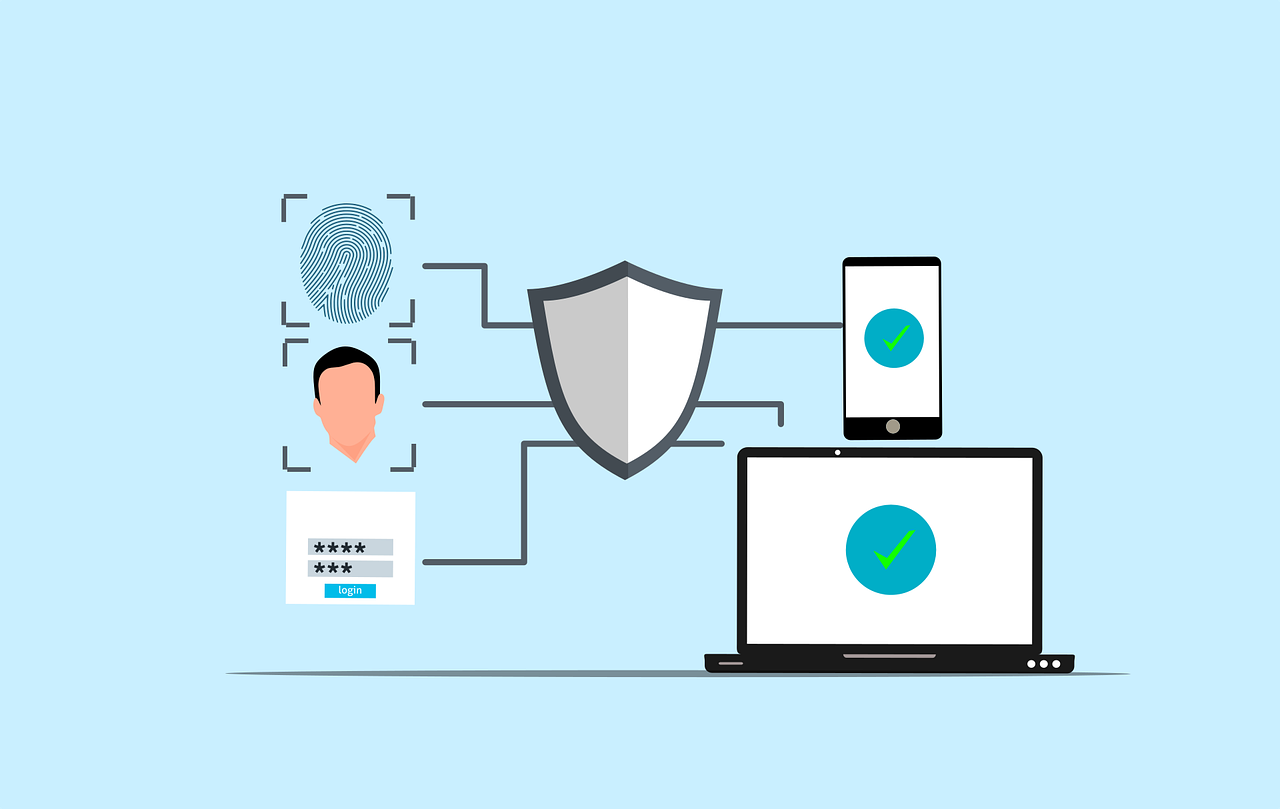
A Small Business Guide to Implementing Multi-Factor Authentication (MFA)

Free cybersecurity security authentication vector

A Small Business Guide to Implementing Multi-Factor Authentication (MFA)

Have you ever wondered how vulnerable your business is to cyberattacks? According to recent reports, nearly 43% of cyberattacks target small businesses, often exploiting weak security measures. 

One of the most overlooked yet highly effective ways to protect your company is through Multi-Factor Authentication (MFA). This extra layer of security makes it significantly harder for hackers to gain access, even if they have your password. 

This article explains how to implement Multi-Factor Authentication for your small business. With this knowledge, you’ll be able to take a crucial step in safeguarding your data and ensuring stronger protection against potential cyber threats.

Why is Multi-Factor Authentication Crucial for Small Businesses?

Before diving into the implementation process, let’s take a step back and understand why Multi-Factor Authentication (MFA) is so essential. Small businesses, despite their size, are not immune to cyberattacks. In fact, they’re increasingly becoming a target for hackers. The reality is that a single compromised password can lead to massive breaches, data theft, and severe financial consequences.

This is where MFA comes in. MFA is a security method that requires more than just a password to access an account or system. It adds additional layers, typically in the form of a time-based code, biometric scan, or even a physical security token. This makes it much harder for unauthorized individuals to gain access to your systems, even if they’ve obtained your password.

It’s no longer a matter of if your small business will face a cyberattack, but when. Implementing MFA can significantly reduce the likelihood of falling victim to common online threats, like phishing and credential stuffing.

What is Multi-Factor Authentication?

Multi Factor Authentication (MFA) is a security process that requires users to provide two or more distinct factors when logging into an account or system. This layered approach makes it more difficult for cybercriminals to successfully gain unauthorized access. Instead of relying on just one factor, such as a password, MFA requires multiple types of evidence to prove your identity. This makes it a much more secure option.

To better understand how MFA works, let’s break it down into its three core components:

Something You Know

The first factor in MFA is the most traditional and commonly used form of authentication (knowledge-based authentication). It usually involves something only the user is supposed to know, like a password or PIN. This is the first line of defense and is often considered the weakest part of security. While passwords can be strong, they’re also vulnerable to attacks such as brute force, phishing, or social engineering.

Example: Your account password or a PIN number

While it’s convenient, this factor alone is not enough to ensure security, because passwords can be easily stolen, guessed, or hacked.

Something You Have

The second factor in MFA is possession-based. This involves something physical that the user must have access to in order to authenticate. The idea is that even if someone knows your password, they wouldn’t have access to this second factor. This factor is typically something that changes over time or is something you physically carry.

Examples:

  • A mobile phone that can receive SMS-based verification codes (also known as one-time passcodes).
  • A security token or a smart card that generates unique codes every few seconds.
  • An authentication app like Google Authenticator or Microsoft Authenticator, which generates time-based codes that change every 30 seconds.

These items are in your possession, which makes it far more difficult for an attacker to access them unless they physically steal the device or break into your system.

Something You Are

The third factor is biometric authentication, which relies on your physical characteristics or behaviors. Biometric factors are incredibly unique to each individual, making them extremely difficult to replicate or fake. This is known as inherence-based authentication.

Examples:

  • Fingerprint recognition (common in smartphones and laptops).
  • Facial recognition (used in programs like Apple’s Face ID).
  • Voice recognition (often used in phone systems or virtual assistants like Siri or Alexa).
  • Retina or iris scanning (used in high-security systems).

This factor ensures that the person attempting to access the system is, indeed, the person they claim to be. Even if an attacker has your password and access to your device, they would still need to replicate or fake your unique biometric traits, which is extraordinarily difficult.

How to Implement Multi-Factor Authentication in Your Business

Implementing Multi-Factor Authentication (MFA) is an important step toward enhancing your business’s security. While it may seem like a complex process, it’s actually more manageable than it appears, especially when broken down into clear steps. Below is a simple guide to help you get started with MFA implementation in your business:

Assess Your Current Security Infrastructure

Before you start implementing MFA, it’s crucial to understand your current security posture. Conduct a thorough review of your existing security systems and identify which accounts, applications, and systems need MFA the most. Prioritize the most sensitive areas of your business, including:

  • Email accounts (where sensitive communications and passwords are often sent)
  • Cloud services (e.g., Google Workspace, Microsoft 365, etc.)
  • Banking and financial accounts (vulnerable to fraud and theft)
  • Customer databases (to protect customer data)
  • Remote desktop systems (ensuring secure access for remote workers)

By starting with your most critical systems, you ensure that you address the highest risks first and establish a strong foundation for future security.

Choose the Right MFA Solution

There are many MFA solutions available, each with its own features, advantages, and pricing. Choosing the right one for your business depends on your size, needs, and budget. Here are some popular options that can cater to small businesses:

Google Authenticator

A free, easy-to-use app that generates time-based codes. It offers an effective MFA solution for most small businesses.

Duo Security

Known for its user-friendly interface, Duo offers both cloud-based and on-premises solutions with flexible MFA options.

Okta

Great for larger businesses but also supports simpler MFA features for small companies, with a variety of authentication methods like push notifications and biometric verification.

Authy

A solution that allows cloud backups and multi-device syncing. This makes it easier for employees to access MFA codes across multiple devices.

When selecting an MFA provider, consider factors like ease of use, cost-effectiveness, and scalability as your business grows. You want a solution that balances strong security with practicality for both your organization and employees.

Implement MFA Across All Critical Systems

Once you’ve chosen an MFA provider, it’s time to implement it across your business. Here are the steps to take:

Step 1: Set Up MFA for Your Core Applications

Prioritize applications that store or access sensitive information, such as email platforms, file storage (Google Drive, OneDrive), and customer relationship management (CRM) systems.

Step 2. Enable MFA for Your Team

Make MFA mandatory for all employees, ensuring it’s used across all accounts. For remote workers, make sure they are also utilizing secure access methods like VPNs with MFA for extra protection.

Step 3. Provide Training and Support

Not all employees may be familiar with MFA. Ensure you offer clear instructions and training on how to set it up and use it. Provide easy-to-access support resources for any issues or questions they may encounter, especially for those who might not be as tech-savvy.

Remember, a smooth implementation requires clear communication and proper onboarding, so everyone understands the importance of MFA and how it protects the business.

Regularly Monitor and Update Your MFA Settings

Cybersecurity is a continuous process, not a one-time task. Regularly reviewing your MFA settings is crucial to ensuring your protection remains strong. You should:

Keep MFA Methods Updated

Consider adopting stronger verification methods, such as biometric scans, or moving to more secure authentication technologies as they become available.

Re-evaluate Authentication Needs

Regularly assess which users, accounts, and systems require MFA, as business priorities and risks evolve.

Respond to Changes Quickly

If employees lose their security devices (e.g., phones or tokens), make sure they can quickly update or reset their MFA settings. Also, remind employees to update their MFA settings if they change their phone number or lose access to an authentication device.

Test Your MFA System Regularly

After implementation, it’s essential to test your MFA system regularly to ensure it’s functioning properly. Periodic testing allows you to spot any vulnerabilities, resolve potential issues, and ensure all employees are following best practices. This could include simulated phishing exercises to see if employees are successfully using MFA to prevent unauthorized access.

In addition, monitoring the user experience is important. If MFA is cumbersome or inconvenient for employees, they may look for ways to bypass it. Balancing security with usability is key, and regular testing can help maintain this balance.

Common MFA Implementation Challenges and How to Overcome Them

While MFA offers significant security benefits, the implementation process can come with its own set of challenges. Here are some of the most common hurdles small businesses face when implementing MFA, along with tips on how to overcome them:

Employee Resistance to Change

Some employees may resist MFA due to the perceived inconvenience of having to enter multiple forms of verification. To overcome this, emphasize the importance of MFA in protecting the business from cyber threats. Offering training and support to guide employees through the setup process can help alleviate concerns.

Integration with Existing Systems

Not all applications and systems are MFA-ready, which can make integration tricky. It’s important to choose an MFA solution that integrates well with your existing software stack. Many MFA providers offer pre-built integrations for popular business tools, or they provide support for custom configurations if needed.

Cost Considerations

The cost of implementing MFA, especially for small businesses with tight budgets, can be a concern. Start with free or low-cost solutions like Google Authenticator or Duo Security’s basic plan. As your business grows, you can explore more robust, scalable solutions.

Device Management

Ensuring that employees have access to the necessary devices (e.g., phones or security tokens) for MFA can be a logistical challenge. Consider using cloud-based authentication apps (like Authy) that sync across multiple devices. This makes it easier for employees to stay connected without relying on a single device.

Managing Lost or Stolen Devices

When employees lose their MFA devices or they’re stolen, it can cause access issues and security risks. To address this, establish a device management policy for quickly deactivating or resetting MFA. Consider solutions that allow users to recover or reset access remotely. Providing backup codes or alternative authentication methods can help ensure seamless access recovery without compromising security during such incidents.

Now is the Time to Implement MFA

Multi-Factor Authentication is one of the most effective steps you can take to protect your business from cyber threats. By adding that extra layer of security, you significantly reduce the risk of unauthorized access, data breaches, and financial losses.

Start by assessing your current systems, selecting the right MFA solution, and implementing it across your critical applications. Don’t forget to educate your team and regularly update your security settings to stay ahead of evolving cyber threats.

If you’re ready to take your business’s security to the next level, or if you need help implementing MFA, feel free to contact us. We’re here to help you secure your business and protect what matters most.

Featured Image Credit

This Article has been Republished with Permission from The Technology Press.
Here Are 5 Data Security Trends to Prepare for in 2024

Free lock security key vector

Here Are 5 Data Security Trends to Prepare for in 2024

With cyber threats evolving at an alarming pace, staying ahead of the curve is crucial. It’s a must for safeguarding sensitive information. Data security threats are becoming more sophisticated and prevalent. The landscape must change to keep up. In 2024, we can expect exciting developments alongside persistent challenges.

Over 70% of business professionals say their data privacy efforts are worth it. And that their business receives “significant” or “very significant” benefits from those efforts.

Staying informed about these trends is crucial. This is true whether you’re an individual or a business safeguarding valuable data.

Here are some key areas to watch.

1. The Rise of the Machines: AI and Machine Learning in Security

Artificial intelligence (AI) and machine learning (ML) are no longer futuristic concepts. They are actively shaping the cybersecurity landscape. This year, we’ll likely see a further rise in their application:

  • Enhanced Threat Detection: AI and ML algorithms excel at analyzing massive datasets. This enables them to identify patterns and anomalies that might escape human notice. This translates to a quicker detection of and reaction to potential cyber threats.
  • Predictive Analytics: AI can predict potential vulnerabilities and suggest proactive measures. It does this by analyzing past cyberattacks and security incidents.
  • Automated Response: AI can go beyond detection and analysis. Professionals can program it to automatically isolate compromised systems. As well as block malicious activity and trigger incident response procedures. This saves valuable time and reduces the potential impact of attacks.

AI and ML offer significant benefits. But it’s important to remember they are tools, not magic solutions. Deploying them effectively requires skilled professionals. Experts who can interpret the data and make informed decisions.

2. Battling the Ever-Evolving Threat: Ransomware

Ransomware is malicious software that encrypts data and demands a ransom for decryption. It has been a persistent threat for years. Unfortunately, it’s not going anywhere in 2024. Hackers are constantly refining their tactics, targeting individuals and businesses alike. Here’s what to expect:

  • More Targeted Attacks: Hackers will likely focus on meticulously selecting high-value targets. Such as critical infrastructure or businesses with sensitive data. They do this to maximize their impact and potential payout.
  • Ransomware-as-a-Service (RaaS): This enables those with limited technical expertise to rent ransomware tools. This makes it easier for a wider range of actors to launch attacks.
  • Double Extortion: Besides encrypting data, attackers might steal it beforehand. They then may threaten to leak it publicly if the ransom isn’t paid, adding pressure on victims.

3. Shifting Strategies: Earlier Data Governance and Security Action

Traditionally, companies have deployed data security measures later in the data lifecycle. For example, after data has been stored or analyzed. But a new approach towards earlier action is gaining traction in 2024. This means:

  • Embedding Security Early On: Organizations are no longer waiting until the end. Instead, they will integrate data controls and measures at the start of the data journey. This could involve setting data classification levels. As well as putting in place access restrictions. They will also be defining data retention policies early in the process.
  • Cloud-Centric Security: More organizations are moving towards cloud storage and processing. As they do this, security solutions will be closely integrated with cloud platforms. This ensures consistent security throughout the entire data lifecycle.
  • Compliance Focus: Data privacy regulations like GDPR and CCPA are becoming increasingly stringent. As this happens, companies will need to focus on data governance to ensure compliance.

4. Building a Fortress: Zero Trust Security and Multi-Factor Authentication

We’re in a world where traditional perimeter defenses are constantly breached. This is why the “Zero Trust” approach is gaining prominence. This security model assumes that no user or device is inherently trustworthy. Users and programs need access verification for every interaction. Here’s how it works:

  • Continuous Verification: Every access request will be rigorously scrutinized. This is regardless of its origin (inside or outside the network). Systems base verification on factors like user identity, device, location, and requested resources.
  • Least Privilege Access: Companies grant users the lowest access level needed to perform their tasks. This minimizes the potential damage if hackers compromise their credentials
  • Multi-Factor Authentication (MFA): MFA adds an important extra layer of security. It requires users to provide extra factors beyond their password.

5. When Things Get Personal: Biometric Data Protection

Biometrics include facial recognition, fingerprints, and voice patterns. They are becoming an increasingly popular form of authentication. But this also raises concerns about the potential for misuse and privacy violations:

  • Secure Storage Is Key: Companies need to store and secure biometric data. This is ideally in encrypted form to prevent unauthorized access or breaches.
  • Strict Regulation: Expect governments to install stricter regulations. These will be around the collection, use, and retention of biometric data. Organizations will need to ensure they adhere to evolving standards. They should also focus on transparency and user consent.

How to Prepare for Evolving Data Security Trends

Feeling a bit overwhelmed? Don’t worry, here are some practical steps you and your organization can take:

  • Stay Informed
  • Invest in Training
  • Review Security Policies
  • Embrace Security Technologies
  • Test Your Systems

Schedule a Data Security Assessment Today!

The data security landscape of 2024 promises to be both intriguing and challenging. We can help you navigate this evolving terrain with confidence.

A data security assessment is a great place to start. Contact us today to schedule yours.


Featured Image Credit

This Article has been Republished with Permission from The Technology Press.

Beware of Deepfakes! Learn How to Spot the Different Types

Free A typewriter with the word deepfake on it Stock Photo

Beware of Deepfakes! Learn How to Spot the Different Types

Have you ever seen a video of your favorite celebrity saying something outrageous? Then later, you find out it was completely fabricated? Or perhaps you’ve received an urgent email seemingly from your boss. But something felt off.

Welcome to the world of deepfakes. This is a rapidly evolving technology that uses artificial intelligence (AI). It does this to create synthetic media, often in the form of videos or audio recordings. They can appear real but are actually manipulated.

People can use deepfakes for creative purposes. Such as satire or entertainment. But their potential for misuse is concerning. Deepfakes have already made it into political campaigns. In 2024, a fake robocall mimicked the voice of a candidate. Scammers wanted to fool people into believing they said something they never said.

Bad actors can use deepfakes to spread misinformation. As well as damage reputations and even manipulate financial markets. They are also used in phishing attacks. Knowing how to identify different types of deepfakes is crucial in today’s world.

So, what are the different types of deepfakes, and how can you spot them?

Face-Swapping Deepfakes

This is the most common type. Here the face of one person is seamlessly superimposed onto another’s body in a video. These can be quite convincing, especially with high-quality footage and sophisticated AI algorithms.

Here’s how to spot them:

  • Look for inconsistencies: Pay close attention to lighting, skin tones, and facial expressions. Do they appear natural and consistent throughout the video? Look for subtle glitches. Such as hair not moving realistically. Or slight misalignments around the face and neck.
  • Check the source: Where did you encounter the video? Was it on a reputable news site or a random social media page? Be cautious of unverified sources and unknown channels.
  • Listen closely: Does the voice sound natural? Does it match the person’s typical speech patterns? Incongruences in voice tone, pitch, or accent can be giveaways.

Deepfake Audio

This type involves generating synthetic voice recordings. They mimic a specific person’s speech patterns and intonations. Scammers can use these to create fake audio messages. As well as make it seem like someone said something they didn’t.

Here’s how to spot them:

  • Focus on the audio quality: Deepfake audio can sound slightly robotic or unnatural. This is especially true when compared to genuine recordings of the same person. Pay attention to unusual pauses. As well as inconsistent pronunciation or a strange emphasis.
  • Compare the content: Does the content of the audio message align with what the person would say? Or within the context in which it’s presented? Consider if the content seems out of character or contradicts known facts.
  • Seek verification: Is there any independent evidence to support the claims made? If not, approach it with healthy skepticism.

Text-Based Deepfakes

This is an emerging type of deepfake. It uses AI to generate written content. Such as social media posts, articles, or emails. They mimic the writing style of a specific person or publication. These can be particularly dangerous. Scammers can use these to spread misinformation or impersonate someone online.

Here’s how to spot them:

  • Read critically: Pay attention to the writing style, vocabulary, and tone. Does it match the way the person or publication typically writes? Look for unusual phrasing, grammatical errors, or inconsistencies in tone.
  • Check factual accuracy: Verify the information presented in the text against reliable sources. Don’t rely solely on the content itself for confirmation.
  • Be wary of emotional triggers: Be cautious of content that evokes strong emotions. Such as fear, anger, or outrage. Scammers may be using these to manipulate your judgment.

Deepfake Videos with Object Manipulation

This type goes beyond faces and voices. It uses AI to manipulate objects within real video footage. Such as changing their appearance or behavior. Bad actors may be using this to fabricate events or alter visual evidence.

Here’s how to spot them:

  • Observe physics and movement: Pay attention to how objects move in the video. Does their motion appear natural and consistent with the laws of physics? Look for unnatural movement patterns. As well as sudden changes in object size, or inconsistencies in lighting and shadows.
  • Seek original footage: If possible, try to find the original source of the video footage. This can help you compare it to the manipulated version and identify alterations.

Staying vigilant and applying critical thinking are crucial in the age of deepfakes.

Familiarize yourself with the different types. Learn to recognize potential red flags. Verify information through reliable sources. These actions will help you become more informed and secure.

Get a Device Security Checkup

Criminals are using deepfakes for phishing. Just by clicking on one, you may have downloaded a virus. A device security checkup can give you peace of mind. We’ll take a look for any potential threats and remove them.

Contact us today to learn more.


Featured Image Credit

This Article has been Republished with Permission from The Technology Press.

10 Most Common Smart Home Issues (and How to Fix Them)

Free smart home house technology vector

10 Most Common Smart Home Issues (and How to Fix Them)

Back when you were a kid, living in a “smart home” probably sounded futuristic. Something out of Back to the Future II or The Jetsons. Well, we don’t yet have flying cars, but we do have video telephones as well as smart refrigerators and voice-activated lights.

But even the most advanced technology can have analog problems. Hackers can get past weak passwords. Bad connections can turn advanced into basic pretty quickly.

Have you run into any issues with your smart home gadgets? Not to worry! We’ve got your back when it comes to troubleshooting several common smart home issues.

Here are some of the most frequent problems along with simple steps to get your smart haven back on track.

1. Connectivity Woes

Are your smart gadgets refusing to connect to Wi-Fi? The main claim to fame of smart devices is that you can access them wirelessly. An internet connection is also vital to integrate several devices into a smart home hub.

If your device is having connection issues, check the basics first. Restart your router and your devices. If that doesn’t work, ensure you’ve positioned your router centrally. This gives you optimal signal strength. Consider a mesh network for large houses. Or invest in a Wi-Fi extender for better coverage.

2. Device Unresponsiveness

Now that we have voice-activated devices, we expect them to always answer. It can be frustrating when a device won’t respond to its “wake word.” We might even raise our voice and ask again… only to be ignored.

Are you having trouble with your smart devices not responding to commands? A simple power cycle (turning them off and on) can often do the trick. Check for software updates on your devices. As well as the corresponding apps. Updating software can fix bugs and improve performance.

3. Battery Drain

Smart devices, especially those battery-powered, can drain quickly. Adjust settings to reduce power consumption. Disable features you don’t use. Such as notification lights or constant background updates. Consider replacing batteries with high-quality ones for optimal performance.

4. Incompatibility Issues

Not all smart devices are created equal. Just because it says “smart” on the box doesn’t mean it plays well with others. When a new device won’t interact with your network, it can mean money down the drain.

Before you buy, check to ensure your devices are compatible with each other. Build your devices around your smart home platform. Review the manufacturer’s specifications thoroughly to avoid compatibility headaches.

5. Security Concerns

Security is paramount in a smart home. There have been horror stories about hacked baby monitors. These stories can get real very fast. You need to pay attention to securing your devices. Rather than getting caught up in plugging them in as fast as possible.

Use strong and unique passwords for all your devices and accounts. Enable two-factor authentication wherever available. Keep your devices and apps updated with the latest security patches.

A few other smart device security tips include:

  • Change the default device name on your network. Choose something generic.
  • Put smart devices on a separate “guest” network. This keeps them separated from devices with more sensitive data.
  • Turn off unnecessary sharing features. These are often enabled by default.

6. App Troubles

Are you running into sporadic problems? Bugs that crop up intermittently?

Sometimes, the problem might lie with the app itself. Check if any app updates are available and install them. Try logging out and logging back in to refresh the connection. If issues persist, uninstall and reinstall the app.

7. Automation Gone Wrong

Smart home automations can be convenient, but sometimes they malfunction. Review your automation rules and ensure they’re set up correctly. Test them individually to identify any faulty triggers or actions.

8. Limited Range

Some smart devices have a limited range. Check the manufacturer’s guide so you know what to expect. Move your devices closer to the hub or router for better communication. Consider using repeaters or extenders if the distance is an issue.

9. Ghost Activity

Ever experienced your smart lights turning on or off randomly? This could be due to factors such as:

  • Accidental voice commands
  • Faulty sensors
  • Scheduled automations you forgot about
  • A hacked device

Review your automation settings and disable any you don’t need. Investigate if your devices are picking up unintended voice commands from other sources. Change passwords and watch out for breaches.

10. Feeling Overwhelmed

It’s easy to get overwhelmed when you’re dealing with several smart devices. Don’t hesitate to consult your device manuals and online resources. You can also get help from our IT experts for specific troubleshooting steps. These resources can offer more guidance tailored to your situation.

Need Help Securing Your Smart Home?

A smart home should simplify your life, not complicate it. These simple solutions can help you navigate common issues. It’s also important to get a smart home security assessment to keep your family protected.

Contact us today to schedule a security checkup for your smart home and gain peace of mind.


Featured Image Credit

This Article has been Republished with Permission from The Technology Press.
Eye-opening Insights from the 2023 Annual Cybersecurity Attitudes and Behaviors Report

Free secure computer protect computer vector

Eye-opening Insights from the 2023 Annual Cybersecurity Attitudes and Behaviors Report

We are living in an era dominated by digital connectivity. You can’t overstate the importance of cybersecurity. As technology advances, so do the threats that lurk in the online world.

Often, it’s our own actions that leave us most at risk of a cyberattack or online scam. Risky behaviors include weak passwords and lax security policies. As well as thinking “This won’t happen to me.” This is why human error is the cause of approximately 88% of data breaches.

The National Cybersecurity Alliance and CybSafe are working to correct poor cyber hygiene. Each year, the duo publishes a report on cybersecurity attitudes and behaviors. The goal is to educate both people and businesses. To educate them on how to better secure their digital landscapes.

This year’s study surveyed over 6,000 people across the U.S., Canada, the U.K., Germany, France, and New Zealand. The survey asked about several things. These include knowledge of cybersecurity risks, security best practices, and challenges faced.

The report reveals some eye-opening insights. These include how people perceive and respond to cyber threats. As well as what they can do to improve their cybersecurity posture. Here are some of the key findings from the report.

We Are Online… a Lot

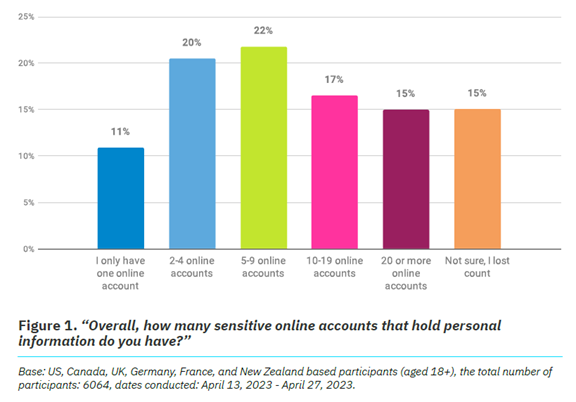
It’s no surprise that 93% of the study participants are online daily. The logins we create continue to expand, as well as those considered “sensitive.” Sensitive accounts hold personal information that could be harmful if stolen.

Nearly half (47%) of the study’s respondents have ten or more sensitive online accounts. This amplifies risk. Especially if people are using the same password for two or more of those accounts.

Online Security Makes People Frustrated

Most people (84%) feel that online security is a priority. But as many as 39% feel frustrated, and nearly the same amount intimidated. It can seem that you just can’t get ahead of the hackers. Just over half of people thought digital security was under their control. That leaves a whole lot that don’t think so.

But that is no reason to let down your defenses and become an easy target. There are best practices you can put in place to safeguard your online accounts that work.

These include:

  • Enabling multi-factor authentication on your accounts
  • Using an email spam filter to catch phishing emails
  • Adding a DNS filter to block malicious websites
  • Using strong password best practices

People Need More Access to Cybersecurity Training

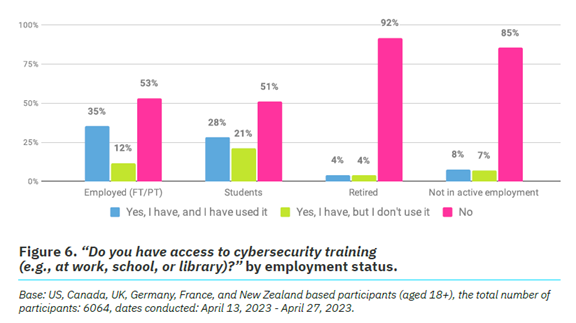
One way to reduce human errors associated with cybersecurity is to train people. The survey found that just 26% of respondents had access to cybersecurity training.

It also broke this down by employment status. We see that those not actively employed are most lacking. Even those employed can use more training access and encouragement. Just 53% report having access to cybersecurity awareness training and using it.

Employers can significantly reduce their risk of falling victim to a data breach. They can do this by beefing up their security awareness training. There is also a large opportunity to provide more training. Particularly to those retired or not actively employed.

Cybercrime Reporting Is Increasing

Over a quarter (27%) of survey participants said they had been a victim of cybercrime.

The types of cybercrimes reported include:

  • Phishing (47%)
  • Online dating scams (27%)
  • Identity theft (26%)

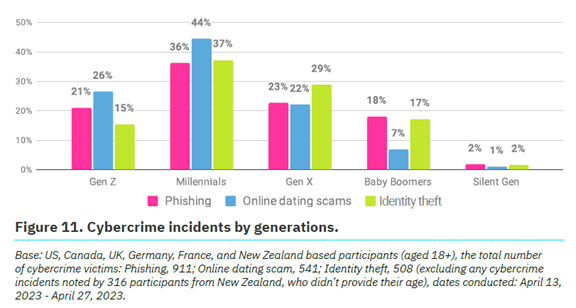
Which generation reported the most cybercrime incidents? Millennials. In fact, Baby Boomers and the Silent Generation reported the fewest.

Cybercrime incidents by generations
Source: The Annual Cybersecurity Attitudes and Behaviors Report 2023

No matter where you fall in the generations, it’s important to adopt security best
practices. We’ll go through some of these next.

Online Security Best Practices to Reduce Your Risk

  1. Strong, Unique Passwords:
    • Start with the basics. Create strong, unique passwords for each online account.
    • Use a combination of uppercase and lowercase letters, numbers, and special characters.
  2. Multi-Factor Authentication (MFA):
    • Enhance your account security with multi-factor authentication.
    • MFA adds an extra barrier to unauthorized access. Even for
      compromised passwords.
  3. Regular Software Updates:
    • Keep all your software, including operating systems and mobile
      apps, up to date.
  4. Beware of Phishing Attacks:
    • Exercise caution when clicking on links or opening attachments
      especially in emails from unknown sources.
    • Verify the legitimacy of emails and websites. Check for subtle
      signs, such as misspelled URLs or unfamiliar sender addresses.
  5. Use Secure Wi-Fi Networks:
    • Ensure you connect to a secure and password-protected Wi-Fi
      network.
    • Avoid using public Wi-Fi for sensitive transactions. Unless using a virtual private network (VPN).
  6. Data Backup:
    • Regularly back up important data to an external device or a secure
      cloud service.
  7. Use Antivirus and Anti-Malware Software:
    • Install reputable antivirus and anti-malware software on all devices.
    • Regularly scan your systems for potential threats.
  8. Be Mindful of Social Media Settings:
    • Review and adjust your privacy settings on social media platforms.
    • Limit the amount of personal information visible to the public.
  9. Secure Your Personal Devices:
    • Lock your devices with strong passwords or biometric
      authentication.
  10. Educate and Stay Informed:
    • Educate yourself and your team through cybersecurity awareness
      programs. This fosters a culture of vigilance and preparedness.

Schedule Cybersecurity Awareness Training Today

A little education on cybersecurity goes a long way toward protecting your data. Our experts can provide security training at the level you need. We’ll help you fortify your defenses against phishing, scams, and cyberattacks.

Contact us today to schedule a chat.


Featured Image Credit

This Article has been Republished with Permission from The Technology Press.
Be Careful When Scanning QR Codes – There’s a New Scam Going Around!

Free qr code scan smartphone vector

Be Careful When Scanning QR Codes - There's a New Scam Going Around!

QR codes are everywhere these days. You can find them on restaurant menus, flyers, and posters. They’re used both offline and online. QR codes are convenient and easy to use. You just scan them with your smartphone camera. You’re then directed to a link, a coupon, a video, or some other online content.

With the rise in popularity of QR codes comes an unfortunate dark side. Cybercriminals are exploiting this technology for nefarious purposes. Scammers create fake QR codes. They can steal your personal information. They can also infect your device with malware or trick you into paying money.

It’s crucial to exercise caution when scanning QR codes. This emerging scam highlights the potential dangers lurking behind those seemingly innocent squares.

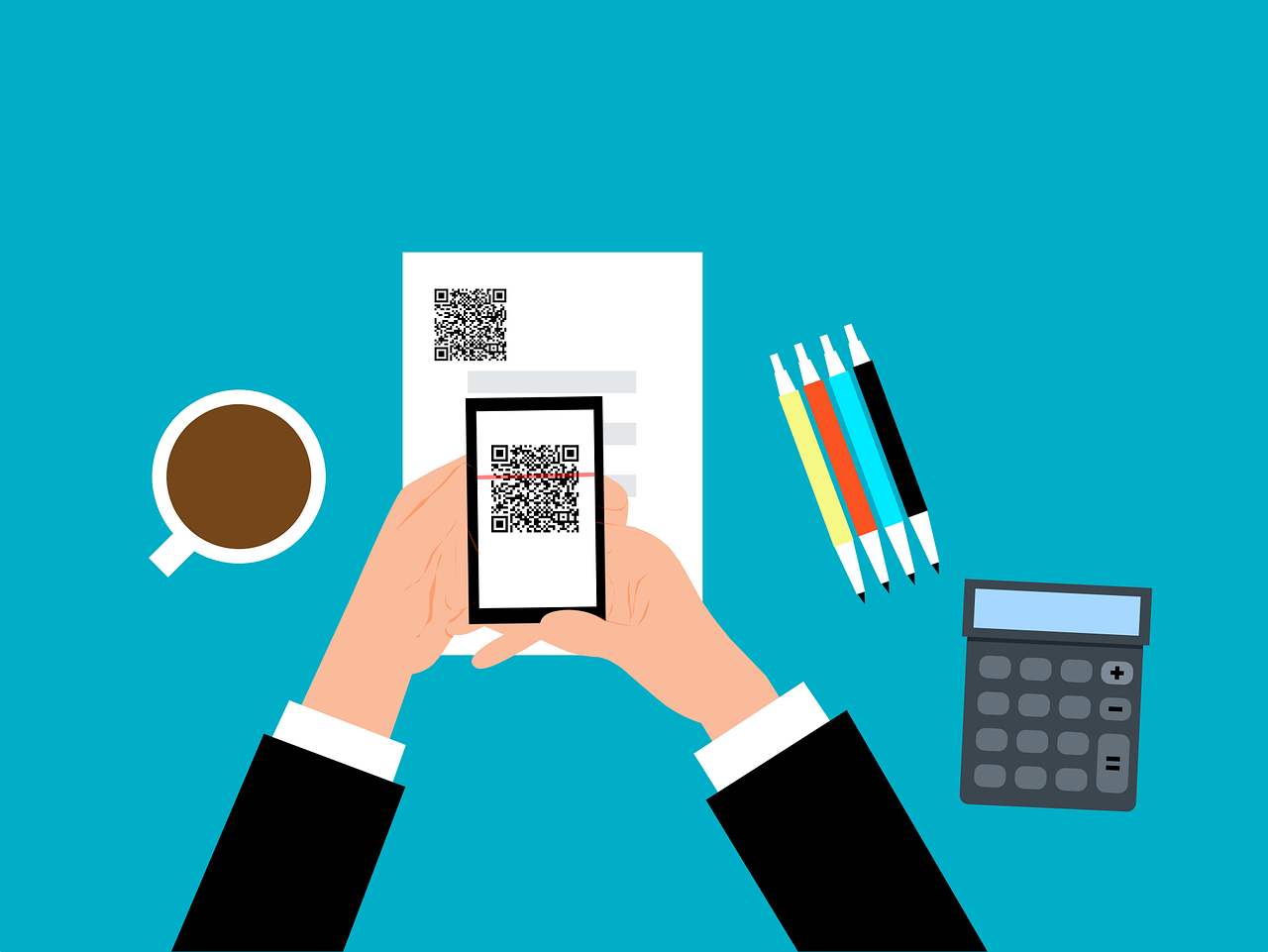
QR Code scan
Image source: Adobe Stock

The QR Code Resurgence

QR codes were originally designed for tracking parts in the automotive industry. They have experienced a renaissance in recent years. As a result, they’re used as a form of marketing today.

They offer the convenience of instant access to information. You simply scan a code. They’ve become an integral part of various industries, including retail and hospitality.

Unfortunately, cybercriminals are quick to adapt. A new phishing scam has emerged, exploiting the trust we place in QR codes.

How the Scam Works

The scammer prints out a fake QR code. They place it over a legitimate one. For example, they might stick it on a poster that advertises a product discount or a movie.

You come along and scan the fake QR code, thinking it’s legitimate. The fake code may direct you to a phishing website. These sites may ask you to enter sensitive data. Such as your credit card details, login credentials, or other
personal information.

Or scanning the QR code may prompt you to download a malicious app. One that contains malware that can do one or more of the following:

  • Spy on your activity
  • Access your copy/paste history
  • Access your contacts
  • Lock your device until you pay a ransom

The code could also direct you to a payment page. A page that charges you a fee for something supposedly free.

Here are some tactics to watch out for.

Malicious Codes Concealed

Cybercriminals tamper with legitimate QR codes. They often add a fake QR code sticker over a real one. They embed malicious content or redirect users to fraudulent websites.

Fake Promotions and Contests

Scammers often use QR codes to lure users into fake promotions or contests. When users scan the code, it may direct them to a counterfeit website. The website may prompt them to provide personal information. This can lead to potential identity theft or financial fraud.

Malware Distribution

Some malicious QR codes start downloads of malware onto the user’s device. This can result in compromised security. Including unauthorized access to personal data and potential damage to the device’s functionality.

Stay Vigilant: Tips for Safe QR Code Scanning

Verify the Source

Be cautious when scanning QR codes from unknown or untrusted sources. Verify the legitimacy of the code and its source. This is especially true if it prompts you to enter personal information.

Use a QR Code Scanner App

Consider using a dedicated QR code scanner app. Use that rather than the default camera app on your device. Some third-party apps provide extra security features. Such as code analysis and website reputation checks.

Inspect the URL Before Clicking

Before visiting a website prompted by a QR code, review the URL. Ensure it matches the legitimate website of the organization it claims to represent.

Avoid Scanning Suspicious Codes

Trust your instincts. If a QR code looks suspicious, refrain from scanning it. Scammers often rely on users’ curiosity. Be careful when scanning QR codes that you see in public places. Don’t scan them if they look suspicious, damaged, or tampered with. Exercising caution is paramount.

Update Your Device and Apps

Keep your device’s operating system and QR code scanning apps up to date. Regular updates often include security patches that protect against known vulnerabilities.

Be Wary of Websites Accessed via QR Code

Don’t enter any personal information on a website that you accessed through a QR code. This includes things like your address, credit card details, login information, etc.

Don’t pay any money or make any donations through a QR code. Only use trusted and secure payment methods.

Contact Us About Phishing Resistant Security Solutions

QR codes can be useful and fun. But they can also be dangerous if you’re not careful. Always scan them with caution. Protect yourself from scammers who want to take advantage of your curiosity.

This scam falls under the umbrella of phishing. Phishing is one of the most dangerous modern risks for individuals and organizations. If you need help ensuring your devices are phishing resistant, just let us know.

Contact us today to learn more.


Featured Image Credit

This Article has been Republished with Permission from The Technology Press.
9 Signs That Your Smart Home Device Has Been Hacked

Free Man Holding Laptop Computer With Both Hands Stock Photo

9 Signs That Your Smart Home Device Has Been Hacked

Smart home devices are becoming more popular and convenient. But they also pose some serious security risks. Hackers can target these devices to access your personal information. As well as spy on your activities or cause damage to your home.

Often the dangers of smart home devices fall under the radar. Seventy-five percent of people feel some level of distrust about the use of their data. Yet most people are willing to use smart home technology.

As we enjoy the convenience of smart living, it’s crucial to be vigilant about cyber threats. A hacker may have compromised your smart system without you even knowing it.

How can you tell if a hacker has compromised your smart home device? Here are some signs to look out for.

1. Unexpected Behavior

Unexpected behavior is the first sign someone has compromised your smart home device. If your device starts acting erratically, it’s time to investigate. Erratic behavior can include:

  • Lights flickering
  • Thermostat settings changing
  • Smart locks behaving unpredictably

Hackers often manipulate smart devices to create disturbances. Noticing these irregularities early can prevent further damage.

2. Unusual Network Traffic

Monitoring your home network is a fundamental aspect of cybersecurity. Have you observed a sudden surge in data usage? Noticed unusual patterns in network traffic? If so, this could indicate unauthorized access.

Hackers may exploit your smart devices to launch attacks or steal sensitive information. Regularly check your router’s activity logs. This helps you stay vigilant against abnormal network behavior.

3. Strange Sounds or Voices

Smart speakers and voice-activated assistants have become commonplace in many households. If you start hearing unfamiliar voices or strange sounds from these devices, it’s a red flag.

Hackers may use compromised devices to eavesdrop or communicate with household members. This poses serious privacy concerns. Ensure that your smart devices are only responding to authorized voices.

4. Device Settings Modification

Smart devices offer customizable settings to cater to individual preferences. Have you noticed unauthorized changes to these settings? Such as alterations in camera angles, sensor sensitivity, or device preferences? If so, there’s a high likelihood that a hacker has compromised your device.

Regularly review and update your device settings. This helps you maintain control over your smart home ecosystem.

5. Unexplained Data Transfers

Smart devices often collect and send data to the cloud for analysis or storage. Keep an eye on your device’s data usage. Be wary of unexplained data transfers. Hackers may exploit vulnerabilities to extract sensitive information from your devices.

Regularly review the data usage patterns of your smart devices. This helps you to identify any suspicious activity.

6. Device Inaccessibility

Suddenly finding yourself locked out of your smart home devices could be a sign of hacking. Hackers may change passwords or enable two-factor authentication without your consent. They can take control of your accounts. This renders you unable to access or manage your devices.

Always act promptly to regain control. Secure your accounts if you suspect unauthorized access.

7. New or Unknown Devices on the Network

Regularly review the list of devices connected to your home network. Do you spot unfamiliar or unauthorized devices? If so, it’s a clear sign that someone may have breached your network.

Hackers often connect to your network. They do this to exploit vulnerabilities in smart devices or launch attacks. Secure your network with strong passwords. Also, consider implementing network segmentation for added protection.

8. Frequent Software Glitches

Smart devices receive regular software updates. These updates patch vulnerabilities and enhance security. Have you noticed frequent software glitches? Or has your device failed to update? It could be a sign of interference
by a malicious actor.

Ensure that your smart devices are running the latest firmware. This ensures it has the latest security patches and bug fixes installed.

9. Emails or Messages Confirming Changes You Didn’t Make

Some smart devices send notifications or emails to confirm changes such as changes in settings, passwords, or device access. Did you receive such confirmations for actions you didn’t take? If so, this is a clear sign of unauthorized access.

Take immediate action to secure your account. This includes changing passwords and reviewing access permissions.

Need Help Securing Your Smart Home & Peace of Mind?

As our homes become smarter, so must our approach to cybersecurity. The first step in safeguarding your digital domain is recognizing signs. The signs that a hacker has compromised your smart home device.

Remember, smart home devices can make your life easier and more comfortable. But they also need careful maintenance and protection.

Need some guidance? We can help you ensure that your smart home remains a secure haven of innovation. Instead of a vulnerable target for cyber threats.

Contact us today to schedule a smart home security consultation.


Featured Image Credit

This Article has been Republished with Permission from The Technology Press.
5 Cybersecurity Predictions for 2024 You Should Plan For

Free Person Using Macbook Air Stock Photo

5 Cybersecurity Predictions for 2024 You Should Plan For

Cybersecurity is a constantly evolving field. There are new threats, technologies, and opportunities emerging every year. As we enter 2024, organizations need to be aware of current and future cyber threats. Businesses of all sizes and sectors should plan accordingly.

Staying ahead of the curve is paramount to safeguarding digital assets. Significant changes are coming to the cybersecurity landscape. Driving these changes are emerging technologies and evolving threats. As well as shifting
global dynamics.

Next, we’ll explore key cybersecurity predictions for 2024 that you should consider.

1. AI Will Be a Double-edged Sword

Artificial intelligence (AI) has been a game-changer for cybersecurity. It has enabled faster and more accurate threat detection, response, and prevention. But AI also poses new risks. Such as adversarial AI, exploited vulnerabilities, and misinformation.

For example, malicious actors use chatbots and other large language models to generate:

  • Convincing phishing emails
  • Fake news articles
  • Deepfake videos

This malicious content can deceive or manipulate users. Organizations will need to put in place robust security protocols. This includes embracing a human-in- the-loop approach. As well as regularly tracking and reviewing their AI systems. These steps will help them mitigate these risks and harness the power of AI for a more secure future.

2. Quantum Computing Will Become a Looming Threat

Quantum computing is still a few years away from reaching its full potential. But it is already a serious threat to the security of current encryption standards.

Quantum computers can potentially break asymmetric encryption algorithms. These algorithms are widely used to protect data in transit and at rest. This means that quantum-enabled hackers could compromise sensitive data, like financial transactions.

Organizations will need to start preparing for this scenario. They can do this by assessing their potential risks first. Then, adopting quantum-resistant technologies and deploying quantum-safe architectures.

3. Hacktivism Will Rise in Prominence

Hacktivism is the use of hacking techniques to promote a political or social cause such as exposing corruption, protesting injustice, or supporting a movement.

Hacktivism has been around for decades. But it’s expected to increase in 2024. Particularly during major global events. These may include the Paris Olympics and the U.S. Presidential Election as well as specific geopolitical conflicts.

Hacktivists may target organizations that they perceive as adversaries or opponents. This can include governments, corporations, or media outlets. These attacks can disrupt their operations. As well as leak their data or deface their websites.

Organizations will need to be vigilant against potential hacktivist attacks. This includes being proactive in defending their networks, systems, and reputation.

4. Ransomware Will Remain a Persistent Threat

Ransomware is a type of malware that encrypts the victim’s data. The attacker then demands a ransom for its decryption. Ransomware has been one of the most damaging types of cyberattacks in recent years.

In 2023, ransomware attacks increased by more than 95% over the prior year.

Ransomware attacks are likely to continue increasing in 2024. Due to new variants, tactics, and targets emerging. For example, ransomware attackers may leverage AI to enhance their encryption algorithms as well as evade detection and customize their ransom demands.

Hackers may also target cloud services, IoT devices, or industrial control systems. This could cause more disruption and damage. Organizations will need to put in place comprehensive ransomware prevention and response strategies. Including:

  • Backing up their data regularly
  • Patching their systems promptly
  • Using reliable email and DNS filtering solutions
  • Educating their users on how to avoid phishing emails

5. Cyber Insurance Will Become More Influential

Cyber insurance covers the losses and liabilities resulting from cyberattacks. It has become more popular and important in recent years. This is due to cyberattacks becoming more frequent and costly.

Cyber insurance can help organizations recover from cyber incidents faster and more effectively. It provides financial compensation, legal help, or technical support.

But cyber insurance can also influence the security practices of organizations. More cyber insurers may impose certain requirements or standards on their customers. Such as implementing specific security controls or frameworks. Organizations will need to balance the benefits and costs of cyber insurance as
well as ensure that they are in compliance with their cyber insurers’ expectations.

Be Proactive About Cybersecurity – Schedule an Assessment

It’s clear that the cybersecurity landscape will continue to evolve rapidly. Organizations and individuals must proactively prepare for emerging threats. This includes adopting advanced technologies and prioritizing workforce development as well as staying abreast of regulatory changes.

Put a comprehensive cybersecurity strategy in place. One that encompasses these predictions. This will help you navigate the digital frontier with resilience and vigilance.

Need help ensuring a secure and trustworthy digital environment for years to come? Contact us today to schedule a cybersecurity assessment.


Featured Image Credit

This Article has been Republished with Permission from The Technology Press.
These 7 AI Trends Are Sweeping the Cybersecurity Realm

a computer circuit board with a brain on it

These 7 AI Trends Are Sweeping the Cybersecurity Realm

Relentless digital innovation has defined the last few years. The symbiotic relationship between AI and cybersecurity has become pivotal especially when it comes to safeguarding sensitive information and digital assets.

As cyber threats evolve in complexity, AI has emerged as a formidable ally. It empowers organizations with advanced tools and techniques. Helping them to stay one step ahead of malicious actors.

In this exploration, we delve into cutting-edge AI trends. The trends that are reshaping the cybersecurity realm as well as fortifying defenses against an ever-expanding array of cyber threats.

The Rise of AI in Cybersecurity

As cyber threats grow in sophistication, traditional measures face challenges in keeping pace. This is where AI steps in. It offers a dynamic and adaptive approach to cybersecurity.

Machine learning algorithms, neural networks, and other AI technologies analyze vast datasets. They do this at unprecedented speeds. They identify patterns and anomalies that might elude human detection.

58% of security professionals expect a completely new set of cyber risks in the coming years.

The integration of AI in cybersecurity doesn’t replace human expertise. It enhances it. This allows security professionals to focus on strategic decision-making. All while AI handles the heavy lifting of data analysis and threat detection.

AI Trends Sweeping the Cybersecurity Realm

1. Predictive Threat Intelligence

AI is revolutionizing threat intelligence by enabling predictive capabilities. Machine learning algorithms analyze historical data, current threats, and emerging patterns. It does this to predict potential future cyber threats. This proactive approach allows organizations to put in place preemptive measures as well as close vulnerabilities before hackers exploit them.

2. Behavioral Analytics

Traditional signature-based approaches struggle to keep up with zero-day attacks as well as advanced “smart phishing.” But AI-driven behavioral analytics take a different approach. They focus on understanding the normal behavior of systems and users. Deviations from these patterns trigger alerts. This helps in identifying potential threats. Identification is based on anomalous activities rather than known signatures.

3. Autonomous Security Systems

The concept of autonomous security systems, empowered by AI, is gaining prominence. These systems can automatically detect, analyze, and respond to cyber threats in real-time. This minimizes response times and reduces the impact of security incidents. The ability to automate routine security tasks enhances efficiency. It also allows human experts to focus on strategic aspects of cybersecurity.

4. Explainable AI (XAI)

AI plays an increasingly critical role in cybersecurity decision-making. This makes the need for transparency paramount. Explainable AI (XAI) addresses this concern. It provides insights into how AI algorithms reach specific conclusions. This enhances trust in AI-driven cybersecurity. It also helps security professionals understand the decisions made by AI systems.

5. Cloud Security Augmentation

With the proliferation of cloud services, securing cloud environments has become a priority. AI is being leveraged to enhance cloud security. A few ways that it does this is by:

  • Monitoring activities
  • Detecting anomalies
  • Responding to threats in cloud-based infrastructures

The dynamic nature of cloud environments requires adaptive security measures. This makes AI a natural fit for bolstering cloud security.

6. Deception Technology

Deception technology involves creating decoy assets within an organization’s network to mislead attackers. Companies are now integrating AI into deception technology to make decoys more convincing as well as more responsive to attackers’ behavior. This helps in early threat detection. It also provides valuable insights into attacker tactics and techniques.

7. Zero Trust Architecture

Zero Trust Architecture, supported by AI, challenges the traditional security model. Where systems trust entities inside and distrust entities outside the network. AI-driven continuous authentication and monitoring ensure that trust is never assumed. It dynamically adapts access privileges. It does this based on real-time assessments of user behavior and risk factors.

Embracing the Future of Cybersecurity with AI

As the threat landscape evolves, the incorporation of AI in cybersecurity is important. It’s not just a strategic choice, it’s a necessity. These AI trends mark a paradigm shift. They are enabling organizations to build more resilient and adaptive cybersecurity frameworks.

It’s important to stay informed and embrace the transformative power of AI. This helps businesses navigate the complexities of the digital landscape. And do it with confidence, fortifying defenses against emerging threats.

AI stands as a beacon of innovation. It continually pushes the boundaries of what’s possible in the realm of cybersecurity. The symbiotic relationship between human expertise and AI-driven capabilities is vital. It will shape the future of data security. Helping ensure a safer digital landscape for businesses and individuals alike.

Schedule a Cybersecurity Upgrade Assessment

How strong are your digital defenses against sophisticated threats? The bad guys are also using AI. This means more dangerous phishing and network attacks. Need some help assessing your strength?

Sign up for a cybersecurity assessment and shed light on your capabilities. We can help you incorporate AI-based protection and fortify your network from attacks.

Give us a call today to schedule a chat.


Featured Image Credit

This Article has been Republished with Permission from The Technology Press.